 唐小鸭
dbf51117a1
唐小鸭
dbf51117a1
* test(replication): expect CopyObject and snowball extract to schedule replication

Red-phase TDD tests for P0-6: CopyObject never consults the bucket
replication config (no pending stamp, no schedule, and the destination
inherits the source's stale replication status metadata wholesale), and
snowball auto-extract members are never scheduled either.

- usecase white-box: observe MUST_REPLICATE_OBJECT_CALLS for
  execute_copy_object (currently 0, must be 1) and
  execute_put_object_extract (currently 0, must be 2 for a two-member
  archive), plus stale replication-status metadata cleanup assertions
  (MinIO filterReplicationStatusMetadata parity).
- e2e: CopyObject destination and snowball-extracted members must appear
  on the remote replication target and reach COMPLETED on the source.

Red evidence (before fix):
  copy_object_computes_replication_decision_and_strips_stale_status
    assertion failed: left: 0, right: 1
  put_object_extract_computes_replication_decision_per_entry
    assertion failed: left: 0, right: 2

* fix(replication): schedule replication for CopyObject and snowball extracted objects

CopyObject and snowball auto-extract never consulted the bucket
replication config: no PENDING stamp, no post-commit schedule, and no
scanner-heal backstop (heal only re-drives Pending/Failed objects, and
these objects carried no status at all). Worse, the copy path cloned the
source metadata wholesale, so a destination object inherited the
source's replication bookkeeping and could present a fake
COMPLETED/REPLICA state.

Mirroring the PUT path (single immutable decision drives both the
pending metadata and the post-commit schedule, rustfs/backlog#1320):

- execute_copy_object: strip the source's replication status metadata
  (internal replication/replica status + timestamps under both
  compatibility prefixes, plus x-amz-replication-status) for
  non-inbound requests — MinIO filterReplicationStatusMetadata parity;
  the cleanup runs before the decision so an inherited REPLICA status
  cannot suppress it. Then compute must_replicate_object once, stamp
  PENDING when it replicates, and schedule after the copy commits and
  the self-copy lock guard is released. Inbound replica writes keep
  their authorized metadata and are declined inside
  must_replicate_object, so replicas are never re-scheduled outbound.

- execute_put_object_extract: same stamp + schedule per extracted
  member object (MinIO PutObjectExtract parity).

- execute_put_object dispatch: an authorized inbound replication PUT is
  stored verbatim instead of being re-dispatched into the extract path.
  Extracted members keep x-amz-meta-snowball-auto-extract in their user
  metadata and the replication client replays stored metadata as
  headers, so the target used to try to untar each member's own bytes,
  permanently failing replication for non-archive members (surfaced by
  the new snowball e2e test).

Green evidence:
- copy_object_computes_replication_decision_and_strips_stale_status,
  put_object_extract_computes_replication_decision_per_entry (red: 0
  decisions; green: 1 and 2), plus the existing PUT/object-lock
  decision-count tests stay green.
- e2e test_copy_object_replicates_to_target and
  test_snowball_extract_replicates_members_to_target pass against two
  live instances.
RustFS is a high-performance, distributed object storage system built in Rust.





Getting Started · Docs · Bug reports · Discussions
English | 简体中文 | Deutsch | Español | français | 日本語 | 한국어 | Portuguese | Русский
RustFS is a high-performance, distributed object storage system built in Rust—one of the most loved programming languages worldwide. RustFS combines the simplicity of MinIO with the memory safety and raw performance of Rust. It offers broad S3 API compatibility for supported features, is completely open-source, and is optimized for data lakes, AI, and big data workloads.
Unlike other storage systems, RustFS is released under the permissible Apache 2.0 license, avoiding the restrictions of AGPL. With Rust as its foundation, RustFS delivers superior speed and secure distributed features for next-generation object storage.
Feature & Status
- High Performance: Built with Rust to ensure maximum speed and resource efficiency.
- Distributed Architecture: Scalable and fault-tolerant design suitable for large-scale deployments.
- S3 Compatibility: Seamless integration with common S3-compatible applications and tools; current coverage is tracked in the S3 compatibility matrix.
- OpenStack Swift API: Native support for Swift protocol with Keystone authentication.
- OpenStack Keystone Integration: Native support for OpenStack Keystone authentication with X-Auth-Token headers.
- Data Lake Support: Optimized for high-throughput big data and AI workloads.
- Open Source: Licensed under Apache 2.0, encouraging unrestricted community contributions and commercial usage.
- User-Friendly: Designed with simplicity in mind for easy deployment and management.
| Feature | Status | Feature | Status |
|---|---|---|---|
| S3 Core Features | ✅ Available | Bitrot Protection | ✅ Available |
| Upload / Download | ✅ Available | Single Node Mode | ✅ Available |
| Versioning | ✅ Available | Bucket Replication | ✅ Available |
| Logging | ✅ Available | Lifecycle Management | 🚧 Under Testing |
| Event Notifications | ✅ Available | Distributed Mode | 🚧 Under Testing |
| K8s Helm Charts | ✅ Available | RustFS KMS | 🚧 Under Testing |
| Keystone Auth | ✅ Available | Multi-Tenancy | ✅ Available |
| Swift API | ✅ Available | Swift Metadata Ops | 🚧 Partial |
RustFS vs MinIO Performance
Stress Test Environment:
| Type | Parameter | Remark |
|---|---|---|
| CPU | 2 Core | Intel Xeon (Sapphire Rapids) Platinum 8475B, 2.7/3.2 GHz |
| Memory | 4GB | |
| Network | 15Gbps | |
| Drive | 40GB x 4 | IOPS 3800 / Drive |
https://github.com/user-attachments/assets/2e4979b5-260c-4f2c-ac12-c87fd558072a
RustFS vs Other Object Storage
| Feature | RustFS | Other Object Storage |
|---|---|---|
| Console Experience | Powerful Console Comprehensive management interface. |
Basic / Limited Console Often overly simple or lacking critical features. |
| Language & Safety | Rust-based Memory safety by design. |
Go or C-based Potential for memory GC pauses or leaks. |
| Data Sovereignty | No Telemetry / Full Compliance Guards against unauthorized cross-border data egress. Compliant with GDPR (EU/UK), CCPA (US), and APPI (Japan). |
Potential Risk Possible legal exposure and unwanted data telemetry. |
| Licensing | Permissive Apache 2.0 Business-friendly, no "poison pill" clauses. |
Restrictive AGPL v3 Risk of license traps and intellectual property pollution. |
| Compatibility | S3-Compatible Core Works with common S3-compatible clients, with coverage tracked in the compatibility matrix. |
Variable Compatibility May lack support for local cloud vendors or specific APIs. |
| Edge & IoT | Strong Edge Support Ideal for secure, innovative edge devices. |
Weak Edge Support Often too heavy for edge gateways. |
| Risk Profile | Enterprise Risk Mitigation Clear IP rights and safe for commercial use. |
Legal Risks Intellectual property ambiguity and usage restrictions. |
Staying ahead
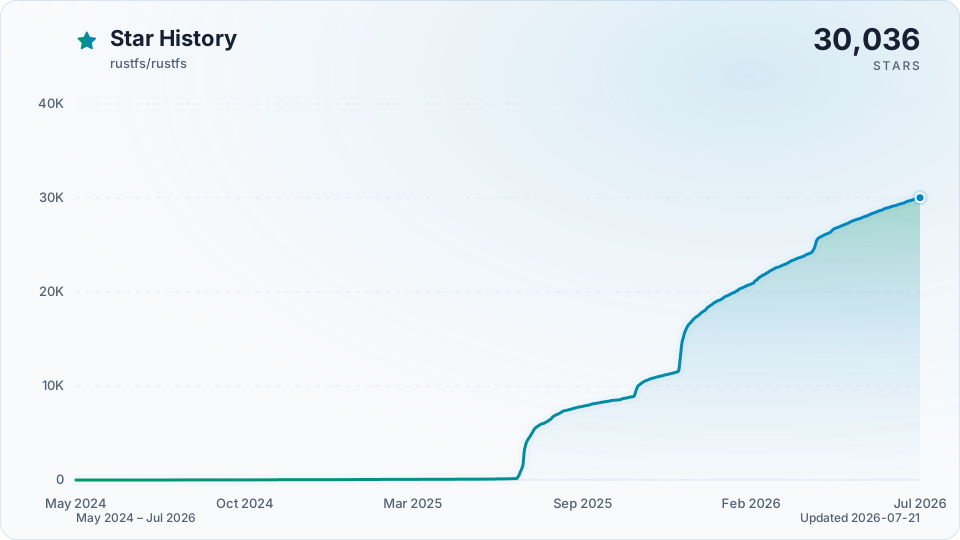
Star RustFS on GitHub and be instantly notified of new releases.
Quickstart
To get started with RustFS, follow these steps:
1. One-click Installation (Option 1)
curl -O https://rustfs.com/install_rustfs.sh && bash install_rustfs.sh
2. Docker Quick Start (Option 2)
The RustFS container runs as a non-root user rustfs (UID/GID 10001:10001). If you bind-mount host directories with Docker or Compose, every mounted path must be writable by that user, otherwise startup may fail with permission denied errors. This applies to data directories, log directories, and TLS certificate directories when RUSTFS_TLS_PATH is enabled.
# Create data and logs directories
mkdir -p data logs

# Change the owner of these directories
chown -R 10001:10001 data logs

# Using latest version
docker run -d -p 9000:9000 -p 9001:9001 -v $(pwd)/data:/data -v $(pwd)/logs:/logs rustfs/rustfs:latest

# Using specific version
docker run -d -p 9000:9000 -p 9001:9001 -v $(pwd)/data:/data -v $(pwd)/logs:/logs rustfs/rustfs:1.0.0-beta.12
If you use podman instead of docker, you can install the RustFS with the below command
# Create data and logs directories
mkdir -p data logs

# Run the container (podman will automatically set the folders ownership)
podman run -d -p 9000:9000 -p 9001:9001 -v $(pwd)/data:/data:Z,U -v $(pwd)/logs:/logs:Z,U rustfs/rustfs:latest
If you enable TLS with a bind-mounted certificate directory, prepare that mount the same way:
mkdir -p certs
chown -R 10001:10001 certs
You can also use Docker Compose. Using the docker-compose-simple.yml file in the root directory:
docker compose -f docker-compose-simple.yml up -d
Before running Compose with host bind mounts:
- Ensure every mounted host path is writable by
10001:10001. - If you enable TLS, ensure the certificate mount for
/opt/tlsis also readable by10001:10001. - If matching host ownership is not practical, run the
rustfsservice withuser: "<host-uid>:<host-gid>"instead. docker-compose-simple.ymlincludes avolume-permission-helperservice for named volumes.docker-compose-simple.ymlrelies on you to prepare bind-mounted host paths in advance.
Similarly, you can run the command with podman
podman compose -f docker-compose-simple.yml up -d
Webhook notification quick start (Docker):
docker run -d --name rustfs -p 9000:9000 \
  -e RUSTFS_NOTIFY_ENABLE=true \
  -e RUSTFS_NOTIFY_WEBHOOK_ENABLE_PRIMARY=on \
  -e RUSTFS_NOTIFY_WEBHOOK_ENDPOINT_PRIMARY=http://<host-ip>:3020/webhook \
  -e RUSTFS_NOTIFY_WEBHOOK_QUEUE_DIR_PRIMARY=/tmp/rustfs-events \
  -e RUSTFS_OUTBOUND_ALLOW_ORIGINS=http://<host-ip>:3020 \
  rustfs/rustfs:latest
Notes:
RUSTFS_NOTIFY_ENABLE=trueenables the global notify module switch.- For ARN
arn:rustfs:sqs::primary:webhook, use instance-scoped env vars with_PRIMARY. - If queue dir is omitted, default is
/opt/rustfs/events; ensure it is writable by the container runtime user. RUSTFS_NOTIFY_WEBHOOK_SKIP_TLS_VERIFY_PRIMARYdefaults tofalse; enabling it skips webhook TLS certificate verification, allows MITM attacks, and emits a startup warning. PreferRUSTFS_NOTIFY_WEBHOOK_CLIENT_CA_PRIMARYfor private CAs.- Since
1.0.0-beta.11, webhook endpoints on private or container networks (Docker Compose service names,host.docker.internal, RFC 1918 addresses) are blocked unless their exactscheme://host:portorigin is listed inRUSTFS_OUTBOUND_ALLOW_ORIGINS(the origin only, without the path). See Outbound Connection Policy.
NOTE: We recommend reviewing the docker-compose.yml file before running. It defines several services including Grafana, Prometheus, and Jaeger, which are helpful for RustFS observability. If you wish to start Redis or Nginx containers, you can specify the corresponding profiles.
3. Build from Source (Option 3) - Advanced Users
For developers who want to build RustFS Docker images from source with multi-architecture support:
# Build multi-architecture images locally
./docker-buildx.sh --build-arg RELEASE=latest

# Build and push to registry
./docker-buildx.sh --push

# Build specific version
./docker-buildx.sh --release v1.0.0 --push

# Build for custom registry
./docker-buildx.sh --registry your-registry.com --namespace yourname --push
The docker-buildx.sh script supports:
- Multi-architecture builds:
linux/amd64,linux/arm64 - Automatic version detection: Uses git tags or commit hashes
- Registry flexibility: Supports Docker Hub, GitHub Container Registry, etc.
- Build optimization: Includes caching and parallel builds
You can also use Make targets for convenience:
make docker-buildx                    # Build locally
make docker-buildx-push               # Build and push
make docker-buildx-version VERSION=v1.0.0  # Build specific version
make help-docker                      # Show all Docker-related commands
Heads-up (macOS cross-compilation): macOS keeps the default
ulimit -nat 256, socargo zigbuildor./build-rustfs.sh --platform ...may fail withProcessFdQuotaExceededwhen targeting Linux. The build script attempts to raise the limit automatically, but if you still see the warning, runulimit -n 4096(or higher) in your shell before building.
4. Build with Helm Chart (Option 4) - Cloud Native
Follow the instructions in the Helm Chart README to install RustFS on a Kubernetes cluster.
For scanner pacing, cycle budgets, bitrot cadence, lifecycle transition status,
and single-node single-disk idle CPU tuning, see
Scanner Runtime Controls. For
repeatable scanner-pressure validation, see
Scanner Benchmark Runbook. For
drive timeout knobs on slow storage — including the walk stall budget that
governs ListObjects on large prefixes — see
Drive Timeout Tuning.
5. Nix Flake (Option 5)
If you have Nix with flakes enabled:
# Run directly without installing
nix run github:rustfs/rustfs

# Build the binary
nix build github:rustfs/rustfs
./result/bin/rustfs --help

# Or from a local checkout
nix build
nix run
6. X-CMD (Option 6)
If you are an x-cmd user:
# Run directly without installing
x rustfs

# Download the binary and install it to the global environment
x env use rustfs
rustfs --help
Accessing RustFS
- Access the Console: Open your web browser and navigate to
http://localhost:9001to access the RustFS console.- Default credentials:
rustfsadmin/rustfsadmin
- Default credentials:
- Create a Bucket: Use the console to create a new bucket for your objects.
- Upload Objects: You can upload files directly through the console or use S3-compatible APIs/clients to interact with your RustFS instance.
NOTE: To access the RustFS instance via https, please refer to the TLS Configuration Docs.
OIDC Roles Claim (Microsoft Entra ID)
RustFS supports mapping an OIDC claim containing role values into the existing
authorization pipeline. The roles_claim setting is optional: when unset or
empty, only the groups claim contributes to authorization (same as older
RustFS releases). For Microsoft Entra ID app roles, set roles_claim=roles so
both console admin checks and bucket IAM policies can evaluate those roles.
Example environment configuration (opt-in roles claim):
RUSTFS_IDENTITY_OPENID_ENABLE=on
RUSTFS_IDENTITY_OPENID_CONFIG_URL="https://login.microsoftonline.com/<tenant-id>/v2.0/.well-known/openid-configuration"
RUSTFS_IDENTITY_OPENID_CLIENT_ID="<client-id>"
RUSTFS_IDENTITY_OPENID_CLIENT_SECRET="<client-secret>"
RUSTFS_IDENTITY_OPENID_SCOPES="openid,profile,email"
RUSTFS_IDENTITY_OPENID_GROUPS_CLAIM="groups"
RUSTFS_IDENTITY_OPENID_ROLES_CLAIM="roles"
Policy condition example (evaluate app roles directly with jwt:roles; when
roles_claim is configured, RustFS also merges those values into jwt:groups
for backward compatibility with older policies):
{
  "Version": "2012-10-17",
  "Statement": [
    {
      "Effect": "Allow",
      "Action": ["admin:*"],
      "Resource": ["arn:aws:s3:::*"],
      "Condition": {
        "ForAnyValue:StringEquals": {
          "jwt:roles": ["RustFS.ConsoleAdmin"]
        }
      }
    }
  ]
}
Documentation
For detailed documentation, including configuration options, API references, and advanced usage, please visit our Documentation.
Getting Help
If you have any questions or need assistance:
- Check the FAQ for common issues and solutions.
- Join our GitHub Discussions to ask questions and share your experiences.
- Open an issue on our GitHub Issues page for bug reports or feature requests.
Links
- Documentation - The manual you should read
- Changelog - What we broke and fixed
- GitHub Discussions - Where the community lives
- Discord - Chat with the RustFS community
Contact
- Bugs: GitHub Issues
- Business: hello@rustfs.com
- Jobs: jobs@rustfs.com
- General Discussion: GitHub Discussions
- Contributing: CONTRIBUTING.md
Contributors
RustFS is a community-driven project, and we appreciate all contributions. Check out the Contributors page to see the amazing people who have helped make RustFS better.
Star History
License
RustFS is a trademark of RustFS, Inc. All other trademarks are the property of their respective owners.