mirror of
https://github.com/abhinavxd/libredesk.git
synced 2026-10-05 12:55:00 +00:00
 Abhinav Raut
94334a02c6
Abhinav Raut
94334a02c6
Reports overview now has a single range picker (7/30/90 days plus a
custom input) that drives every card at once, instead of a separate
date dropdown per card. Auto-refresh polls every 5 minutes, pauses
when the tab is hidden, and stops after an hour until you refresh.
Card titles are muted, numbers use tabular figures, and SLA colors use
theme tokens instead of raw green/red. The old DateFilter component is
gone.

Move avatar cropping into the shared AvatarUpload component and reuse
it on the profile page. Save is disabled until a new image is picked.

Conversation list emphasizes unread rows with bolder text and tighter
spacing. Empty state, MenuCard, and chart legend get small style
fixes. Consolidate several one-off i18n strings into shared keys.

libredesk
Modern, open source, self-hosted omnichannel customer support desk. Live chat, email, and more in a single binary.
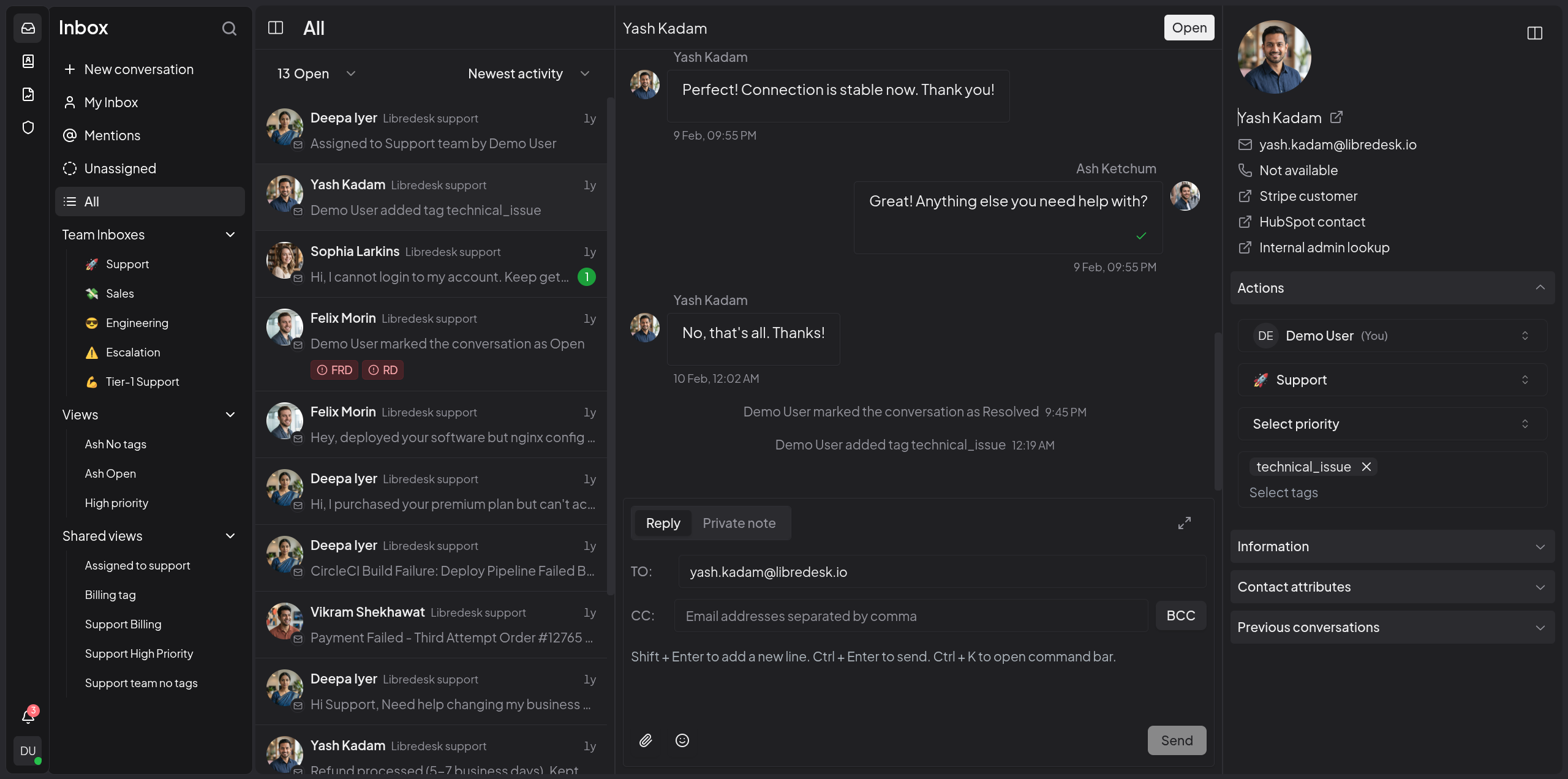
Visit libredesk.io for more info. Check out the live demo.
Features
- Omnichannel inbox
Live chat, email, and more — all in one inbox. Connect support@, billing@, sales@ and manage every conversation from a single, unified interface. - Live chat widget
Embed a real-time chat widget on your website. Engage visitors instantly and handle live conversations right from your support desk. - Granular permissions
Create custom roles with granular permissions for teams and individual agents. - Automations
Eliminate repetitive tasks with powerful automation rules. Auto-tag, assign, and route conversations based on custom conditions. - CSAT surveys
Measure customer satisfaction with automated surveys. - Macros
Save frequently sent messages as templates. With one click, send saved responses, set tags, and more. - Organization
Keep conversations organized with tags, custom statuses for conversations, and snoozing. Find any conversation instantly from the search bar. - Auto assignment
Distribute workload with auto assignment rules. Auto-assign conversations based on agent capacity or custom criteria. - SLA management
Set and track response time targets. Get notified when conversations are at risk of breaching SLA commitments. - Custom attributes
Create custom attributes for contacts or conversations such as the subscription plan or the date of their first purchase. - AI-assist
Instantly rewrite responses with AI to make them more friendly, professional, or polished. - Activity logs
Track all actions performed by agents and admins—updates and key events across the system—for auditing and accountability. - Webhooks
Integrate with external systems using real-time HTTP notifications for conversation and message events. - Command bar
Opens with a simple shortcut (CTRL+K) and lets you quickly perform actions on conversations.
And more — checkout libredesk.io or try the live demo.
Installation
Docker
The latest image is available on DockerHub at libredesk/libredesk:latest
# Download the compose file and sample config file in the current directory.
curl -LO https://github.com/abhinavxd/libredesk/raw/main/docker-compose.yml
curl -LO https://github.com/abhinavxd/libredesk/raw/main/config.sample.toml

# Copy the config.sample.toml to config.toml and edit it as needed.
cp config.sample.toml config.toml

# Run the services in the background.
docker compose up -d

# Setting System user password.
docker exec -it libredesk_app ./libredesk --set-system-user-password
Go to http://localhost:9000 and login with username System and the password you set using the --set-system-user-password command.
Binary
- Download the latest release and extract the libredesk binary.
- Edit config.toml as needed.
./libredesk --installto setup the Postgres DB.- Run
./libredesk --set-system-user-passwordto set the password for the System user. - Run
./libredeskand visithttp://localhost:9000and login with emailSystemand the password you set using the --set-system-user-password command.
Developers
- If you are interested in contributing, please read CONTRIBUTING.md first.
- For local development and setup, refer to the developer setup.
- For planned features and project direction, see ROADMAP.md.
The backend is written in Go and the frontend is Vue.js 3 with Shadcn UI.
Translators
You can help translate libredesk into your language on Crowdin.