Chris F Ravenscroft
4f5795965b
Chris F Ravenscroft
4f5795965b
TestSQLitePlugin has never run. It stats a flat bin/sqlite.so, which no
build target produces (make plugin_sqlite writes bin/linuxamd64/sqlite.so,
xgo writes bin/sqlite-linux-amd64.so), so it always took the skip branch.
Even past that it needs a seeded database, and nothing in the repo seeds
one.

seedplugindb stages the plugin at the path the test and
sample-database.cfg both expect, then starts glauth once so the plugin's
CreateSchema builds the tables before inserting rows. Taking the schema
from the plugin rather than duplicating its DDL here keeps the two from
drifting.

Guarded on bin/sqlite-linux-amd64.so existing, so CI - which never builds
plugins - still skips the test exactly as before.


Claude-Session: https://claude.ai/code/session_014L5EoqGWsuZWr8fCVM6izP

Co-authored-by: Claude Opus 5 (1M context) <noreply@anthropic.com>
GLAuth: LDAP authentication server for developers



Go-lang LDAP Authentication (GLAuth) is a secure, easy-to-use, LDAP server w/ configurable backends.


- Centrally manage accounts across your infrastructure
- Centrally manage SSH keys, Linux accounts, and passwords for cloud servers.
- Lightweight alternative to OpenLDAP and Active Directory for development, or a homelab.
- Store your user directory in a file, local or in S3; SQL database; or proxy to existing LDAP servers.
- Two Factor Authentication (transparent to applications)
- Multiple backends can be chained to inject features
Use it to centralize account management across your Linux servers, your OSX machines, and your support applications (Jenkins, Apache/Nginx, Graylog2, and many more!).
Contributing
- Please base all Pull Requests on dev, not master.
- Format your code automatically using
gofmt -d ./before committing
Quickstart
This quickstart is a great way to try out GLAuth in a non-production environment. Be warned that you should take the extra steps to setup SSL (TLS) for production use!
- Download a precompiled binary from the releases page.
- Download the example config file.
- Start the GLAuth server, referencing the path to the desired config file with
-c../glauth64 -c sample-simple.cfg
- Test with traditional LDAP tools
- For example:
ldapsearch -LLL -H ldap://localhost:3893 -D cn=serviceuser,ou=svcaccts,dc=glauth,dc=com -w mysecret -x -bdc=glauth,dc=com cn=hackers
- For example:
Make Commands
Note - makefile uses git data to inject build-time variables. For best results, run in the context of the git repo.
Documentation
👉 The latest version of GLauth's documentation is available at https://glauth.github.io/ 👈
Quickstart
Get started in three short steps
Usage:
glauth: securely expose your LDAP for external auth

Usage:
  glauth [options] -c <file|s3url>
  glauth -h --help
  glauth --version

Options:
  -c, --config <file>       Config file.
  -K <aws_key_id>           AWS Key ID.
  -S <aws_secret_key>       AWS Secret Key.
  -r <aws_region>           AWS Region [default: us-east-1].
  --ldap <address>          Listen address for the LDAP server.
  --ldaps <address>         Listen address for the LDAPS server.
  --ldaps-cert <cert-file>  Path to cert file for the LDAPS server.
  --ldaps-key <key-file>    Path to key file for the LDAPS server.
  -h, --help                Show this screen.
  --version                 Show version.
Configuration:
GLAuth can be deployed as a single server using only a local configuration file. This is great for testing, or for production if you use a tool like Puppet/Chef/Ansible:
glauth -c glauth.cfg
Here's a sample config wth hardcoded users and groups:
[backend]
  datastore = "config"
  baseDN = "dc=glauth,dc=com"
[[users]]
  name = "hackers"
  uidnumber = 5001
  primarygroup = 5501
  passsha256 = "6478579e37aff45f013e14eeb30b3cc56c72ccdc310123bcdf53e0333e3f416a"   # dogood
  sshkeys = [ "ssh-dss AAAAB3..." ]
[[users]]
  name = "uberhackers"
  uidnumber = 5006
  primarygroup = 5501
  passbcrypt = "243261243130244B62463462656F7265504F762E794F324957746D656541326B4B46596275674A79336A476845764B616D65446169784E41384F4432"   # dogood
[[groups]]
  name = "superheros"
  gidnumber = 5501
More configuration options are documented here and in this sample file
Backends:
For advanced users, GLAuth supports pluggable backends. Currently, it can use a local file, S3 or an existing LDAP infrastructure. Through the use of optional plugins, you can connect SQL databases, PAM, and other datastores.
[backend]
  datastore = "ldap"
  servers = [ "ldaps://server1:636", "ldaps://server2:636" ]
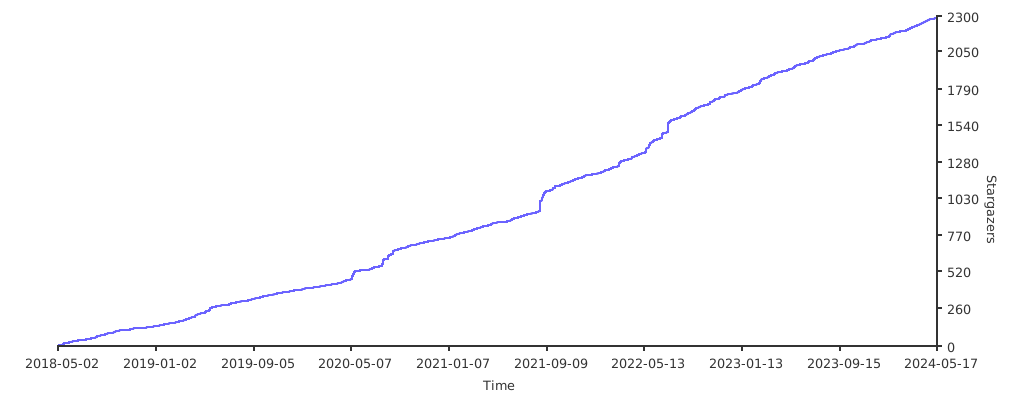
Stargazers over time