 BFlat
eb59e7fcd7
BFlat
eb59e7fcd7
## Summary

Compacts the legacy reference bands above the prompt box (audio ref row,
multi-view/input-mesh row, reference video row) into the reference deck
design already used on the image and video pages. Mobile forms keep
their existing rows.

## Changes

- **Create Audio** - audio tracks are now deck cards (playable tile,
duration badge) with Upload / From library in the deck's "+" menu; band
removed. Mutual-exclusion and "Audio track required" behavior unchanged.
- **Create 3D World** - guide video is now a deck card; store reworked
to the shared `RefVideo[]` shape.
- **Create 3D Object** - Front/Back/Left/Right are always-visible
labeled slot cards next to the image-ref deck (same design as First/Last
frame on video), plus a "Mesh" slot card for mesh-to-mesh models. Upload
logic deduplicated into `mesh-upload.ts`.
- **Webapp PromptBox** - removed the `mediaReferenceRow` band prop; deck
video/audio groups gate on `videoRefsSupported`/`audioRefsSupported` (no
longer video-page-only); new `referenceSlots` prop; `maxImages: 0`
blocks image uploads on pages whose model takes no image refs.
- **Deck lib** - exported `DeckSlotCard`; new `mesh` card kind;
`sortable: false` for fixed slots; non-finite duration caps hide the
seconds limit; collapsed fan width now tracks card count, so a single
ref sits snug against the prompt (multi-ref unchanged).
The IDE for artists.




ArtCraft
ArtCraft is the IDE for interactive AI image and video creation. We turn prompting into crafting, so your ideas become a form of tangible expression and computing. This is Adobe Photoshop for everyone, and we're giving away the source code!
Show, Don't Tell: Advanced Crafting Features
Text-to-image is great, but artists need control. It's important to know what your image will look like before you generate it, and it's vitally important to achieve consistency and repeatability.
| Feature | Demo + Explanation |
|---|---|
| Image to Location | |
| 3D Image Compositing | |
| 2D Image Compositing | |
| Image to 3D Mesh | |
| Character Posing |  You can dynamically pose your characters to achieve the precise character, scene, and camera blocking before calling "action". You can dynamically pose your characters to achieve the precise character, scene, and camera blocking before calling "action". |
| Scene Blocking w/ Kit Bashing | |
| Character Identity Transfer | |
| Background Removal | |
| Mixed Asset Crafting | 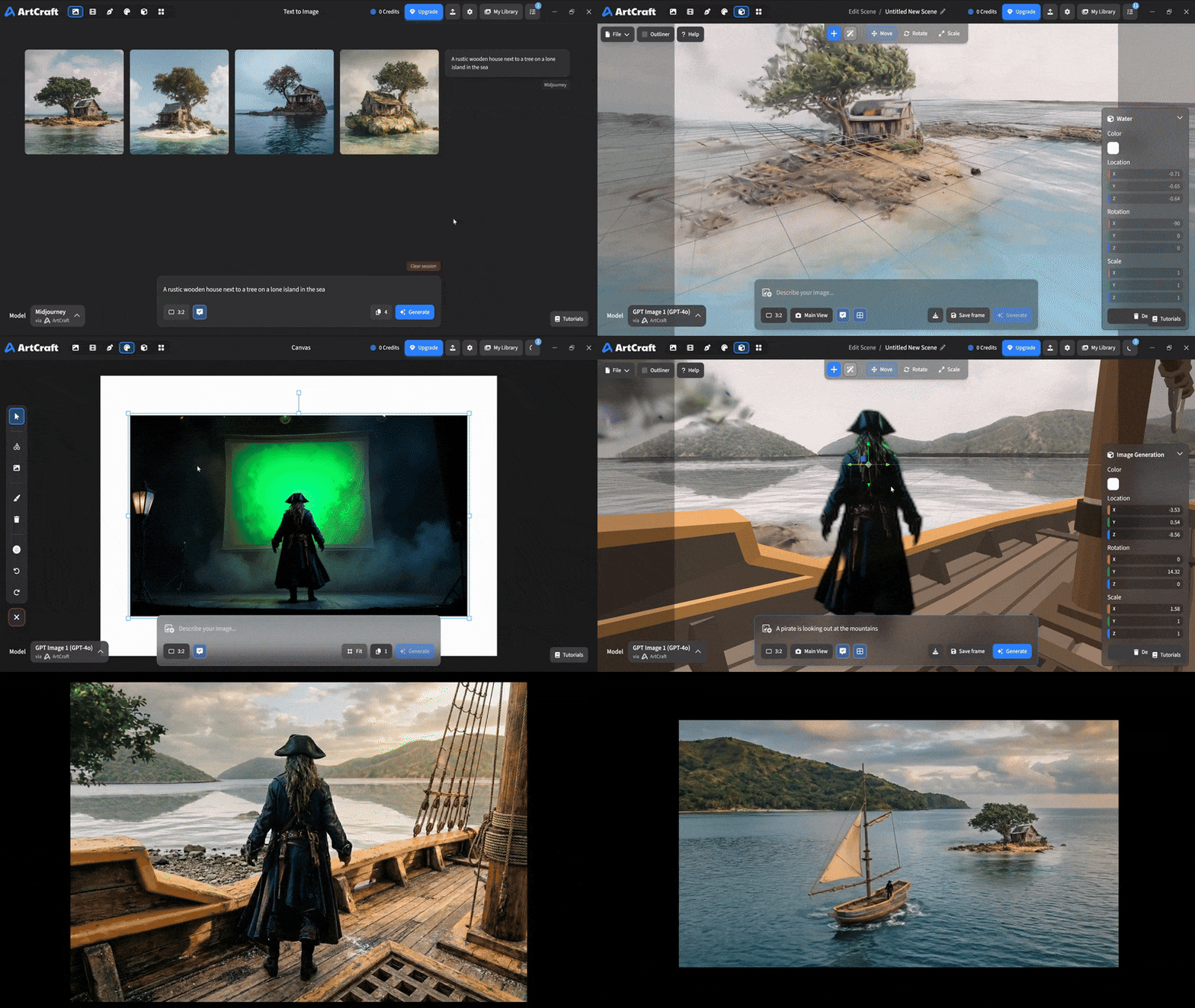 You can use image cutouts, worlds, and simple 3D meshes all together to precisely and intentionally lay out your scenes. You can use image cutouts, worlds, and simple 3D meshes all together to precisely and intentionally lay out your scenes. |
| Scene Blocking | (preview coming soon) |
| Canvas Editing | (preview coming soon) |
| Scene Relighting | (preview coming soon) |
Note: all of the above videos were generated for free with Grok Video; the cost to build this README was negligible.
Quick and Easy Prompting
We haven't abandoned text-to-asset generation for quick prototyping and ideation. We support every popular workflow in a first class fashion.
| Feature | Demo + Explanation |
|---|---|
| Text to Image | |
| Image Editing | |
| Image Editing | |
| Image to Video | |
| Image Inpainting | (preview coming soon) |
| Image Ingredients | (preview coming soon) |
Models and Providers Supported within Artcraft
| Provider | Features |
|---|---|
| Artcraft | Nano Banana, Nano Banana Pro, GPT-Image-1 / 1.5, Seedance 1.0 Lite / 1.5 Pro / 2.0, Seedream 4 / 4.5, Flux 1.1 / Kontext, Veo 2 / 3 / 3.1, Kling 1.6 / 2.1 / 2.5 / 2.6, Sora 2 / Pro, Hunyuan 3d 2 / 3 |
| Grok | Grok Imagine, Grok Video |
| Midjourney | Image Gen (all versions) |
| Sora | Sora 1, Sora 2, GPT-Image-1 |
| WorldLabs | Marble (Gaussian Splat World Generation) |
We're going to be adding the following providers soon: Kling (via Kling website accounts), Google (via API keys), Runway (via website account), Luma (via website account).
We're potentially interested in adding other aggregators for those who already have subscriptions and credits at those providers, for example: OpenArt, FreePik, etc.
Downloads
- Visit our website for the stable Windows and MacOS releases
- Or you can grab a more recent Windows and MacOS build directly
- Linux requires building from source for now