 Tanish Manku
93232c4d73
Tanish Manku
93232c4d73
- Ball sizes now vary organically: smooth spatial value noise drifts size
  clusters across the word, white noise roughens per ball; the neighbor cap
  keeps every draw collision-safe
- Radial halo billboard tracks the cursor BEHIND the text plane, so balls
  silhouette against the glow (additive in dark, soft accent wash in light)
- Cursor point light switched to physical inverse-square falloff (decay 2):
  balls near the cursor are genuinely brighter; the light dims to 30% when
  the pointer leaves so the resting state stays moody
- Dark mode is an eclipse rig: near-black lacquer balls (clearcoat physical
  material), almost no front light, cool key + counter rim from behind, and
  no environment map — scene.environment floods instanced materials at full
  strength regardless of envMapIntensity, which was washing the whole word
  to gray; light mode keeps the procedural room reflections
The IDE for artists.




ArtCraft
ArtCraft is the IDE for interactive AI image and video creation. We turn prompting into crafting, so your ideas become a form of tangible expression and computing. This is Adobe Photoshop for everyone, and we're giving away the source code!
Show, Don't Tell: Advanced Crafting Features
Text-to-image is great, but artists need control. It's important to know what your image will look like before you generate it, and it's vitally important to achieve consistency and repeatability.
| Feature | Demo + Explanation |
|---|---|
| Image to Location | |
| 3D Image Compositing | |
| 2D Image Compositing | |
| Image to 3D Mesh | |
| Character Posing |  You can dynamically pose your characters to achieve the precise character, scene, and camera blocking before calling "action". You can dynamically pose your characters to achieve the precise character, scene, and camera blocking before calling "action". |
| Scene Blocking w/ Kit Bashing | |
| Character Identity Transfer | |
| Background Removal | |
| Mixed Asset Crafting | 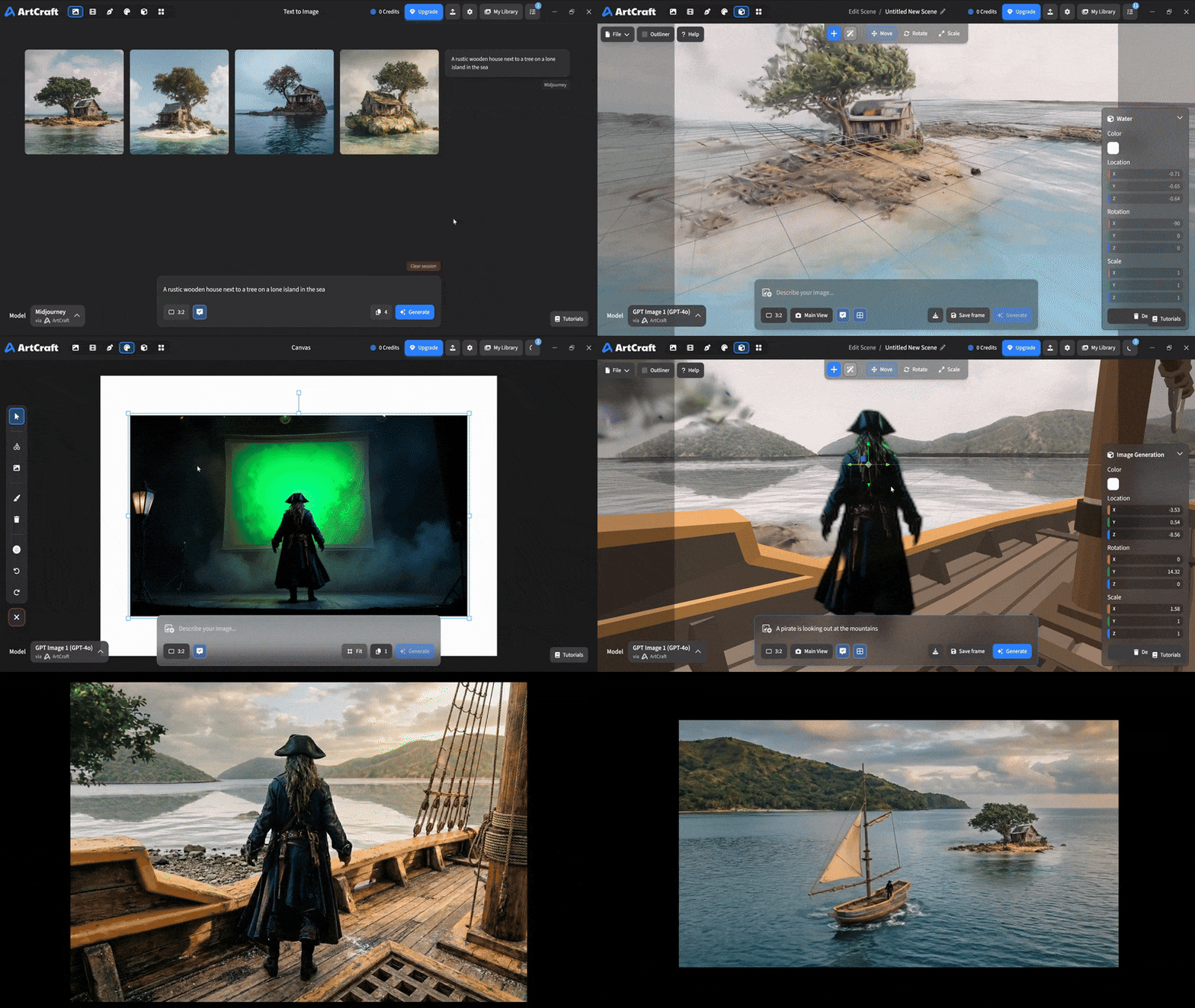 You can use image cutouts, worlds, and simple 3D meshes all together to precisely and intentionally lay out your scenes. You can use image cutouts, worlds, and simple 3D meshes all together to precisely and intentionally lay out your scenes. |
| Scene Blocking | (preview coming soon) |
| Canvas Editing | (preview coming soon) |
| Scene Relighting | (preview coming soon) |
Note: all of the above videos were generated for free with Grok Video; the cost to build this README was negligible.
Quick and Easy Prompting
We haven't abandoned text-to-asset generation for quick prototyping and ideation. We support every popular workflow in a first class fashion.
| Feature | Demo + Explanation |
|---|---|
| Text to Image | |
| Image Editing | |
| Image Editing | |
| Image to Video | |
| Image Inpainting | (preview coming soon) |
| Image Ingredients | (preview coming soon) |
Models and Providers Supported within Artcraft
| Provider | Features |
|---|---|
| Artcraft | Nano Banana, Nano Banana Pro, GPT-Image-1 / 1.5, Seedance 1.0 Lite / 1.5 Pro / 2.0, Seedream 4 / 4.5, Flux 1.1 / Kontext, Veo 2 / 3 / 3.1, Kling 1.6 / 2.1 / 2.5 / 2.6, Sora 2 / Pro, Hunyuan 3d 2 / 3 |
| Grok | Grok Imagine, Grok Video |
| Midjourney | Image Gen (all versions) |
| Sora | Sora 1, Sora 2, GPT-Image-1 |
| WorldLabs | Marble (Gaussian Splat World Generation) |
We're going to be adding the following providers soon: Kling (via Kling website accounts), Google (via API keys), Runway (via website account), Luma (via website account).
We're potentially interested in adding other aggregators for those who already have subscriptions and credits at those providers, for example: OpenArt, FreePik, etc.
Downloads
- Visit our website for the stable Windows and MacOS releases
- Or you can grab a more recent Windows and MacOS build directly
- Linux requires building from source for now