
Docs · Tutorials · Website · Roadmap · Discussions · Sponsor · Buy Me a Coffee
[](https://github.com/studio-saelix/sencho/releases) [](https://hub.docker.com/r/saelix/sencho) [](https://github.com/studio-saelix/sencho/actions/workflows/ci.yml) [](https://github.com/studio-saelix/sencho/actions/workflows/codeql.yml) [](LICENSE) [](https://github.com/studio-saelix/sencho/commits/main) [](https://github.com/studio-saelix/sencho/issues) [](https://sencho.io) [](https://docs.sencho.io) [](https://sencho.io/roadmap)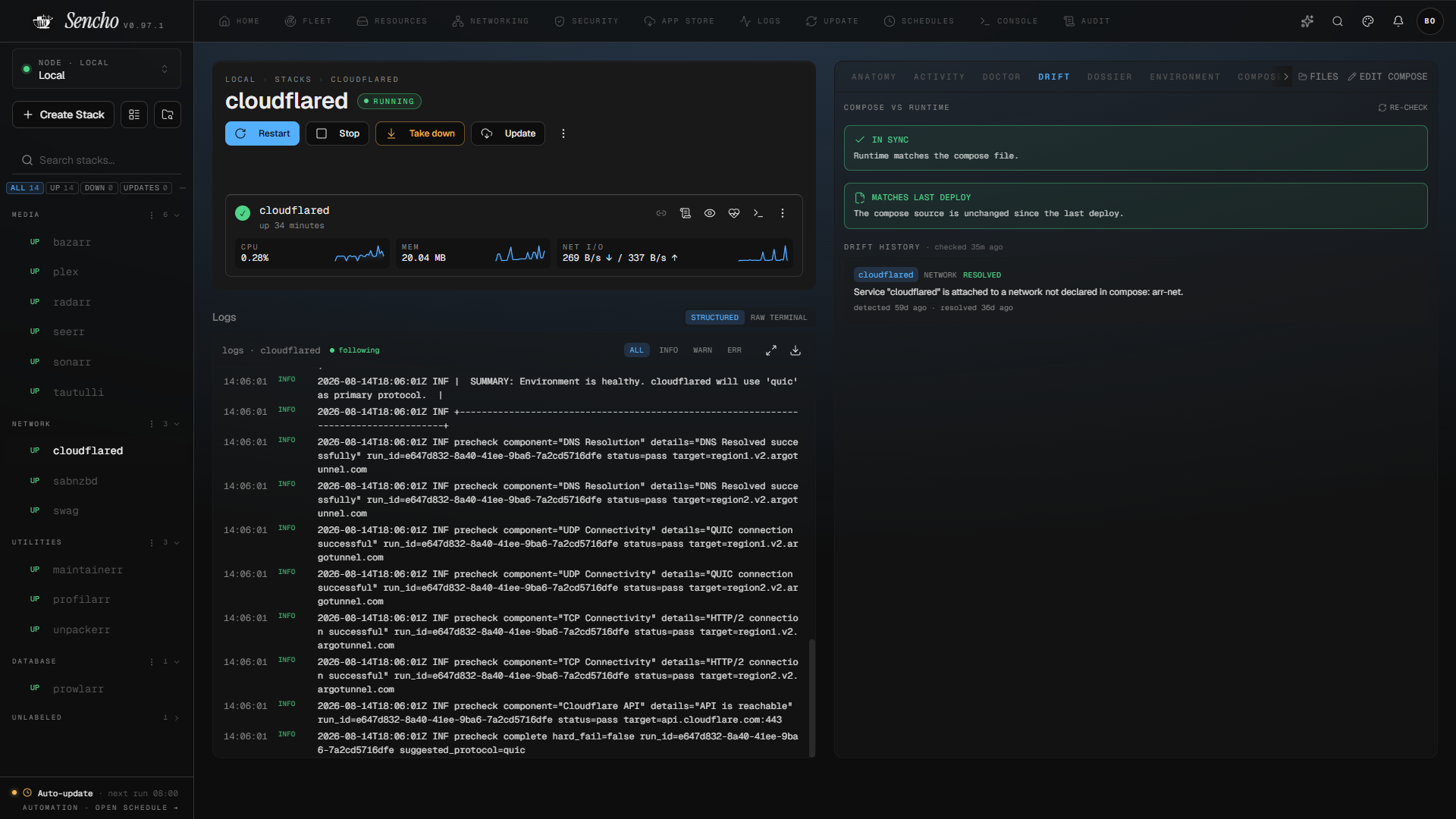 > [!NOTE]
> Sencho is used in production for day-to-day Docker Compose and fleet management. As a pre-1.0 project it still evolves quickly, so review the known limitations and validate against your own setup before deploying it on critical infrastructure.
---
## What Sencho is
Sencho is a Docker Compose control plane for DevOps engineers, platform teams, system administrators and homelab users who run services on Compose and need a real operational surface: a graphical interface that does not give up file-on-disk workflows, and the ability to manage more than one machine without SSH gymnastics or a VPN.
It runs as a single container on your hardware and provides a UI for common Compose operations: deploying, editing files, watching logs, restarting containers, browsing volumes, and recovering from failures. Your compose files stay on the host filesystem and remain the source of truth.
Multi-node was part of the architecture from the start, not bolted on later: every Sencho instance is the same autonomous node, whether it runs alone or as one of many in a fleet. To manage another machine, you install a second Sencho on it and connect them with a long-lived API token; the primary dashboard then acts as an authenticated HTTP and WebSocket proxy across your fleet. Use TLS, a VPN, or a private network for any untrusted link. Each node still uses its local Docker socket (see Quick start), but Sencho does not require SSH and does not expose a remote Docker socket on the network. For nodes behind NAT or strict firewalls, the Pilot Agent establishes a single outbound WebSocket tunnel to the primary, so the remote host opens no inbound port at all.
Sencho is free, open-source software under AGPLv3. Everything below is included in the Community tier with unlimited nodes and users.
---
## Capabilities
### Stacks
- Full Compose lifecycle: create, deploy, restart, stop, take down, pull
- Atomic deployments with automatic rollback on failure
- Monaco editor with diff preview before save and one-click rollback to any prior deploy
- [Health-gated updates](https://docs.sencho.io/features/health-gated-updates) that hold a rollout until health checks pass, with stalled-update detection and in-app recovery
- [Git-sourced stacks](https://docs.sencho.io/features/git-sources) pulled and synced from any repository, with ordered multi-file Compose
- [File explorer](https://docs.sencho.io/features/stack-file-explorer) for compose, env, and supporting files, with move and rename across directories
- [Drift detection](https://docs.sencho.io/features/stack-drift) that compares running containers against the effective Compose model and flags exactly what changed
- [Environment and secrets guardrails](https://docs.sencho.io/features/environment-guardrails) that inventory every variable a stack uses and flag missing or duplicate values, without ever exposing a value
- [Storage portability](https://docs.sencho.io/features/compose-storage) checks that show whether a stack's mounts can move cleanly to another node before you move it
- [Compose Doctor](https://docs.sencho.io/features/compose-doctor) preflight checks that catch compose problems before deploy
- [Stack labels](https://docs.sencho.io/features/stack-labels) for grouping and bulk operations
- [App Store](https://docs.sencho.io/features/app-store) with LinuxServer.io templates by default, or any custom Portainer-compatible registry
### Observability
- Aggregated [log search and stream](https://docs.sencho.io/features/global-observability) across every container in the fleet
- Live container stats, health checks, and image-update notifications on a configurable cadence, with links from each image to its registry and source
- Threshold alerts for CPU, memory, and network
- Read-only [audit log](https://docs.sencho.io/features/audit-log) of every action, with a 14-day recent-activity window
- [Network topology](https://docs.sencho.io/features/fleet-view) view of containers, networks, and nodes
- Documentation-drift flags when a [stack dossier](https://docs.sencho.io/features/stack-dossier) diverges from the running stack
### Fleet
- Multi-node management via authenticated HTTP and WebSocket proxy
- [Fleet view](https://docs.sencho.io/features/fleet-view) with grid and topology layouts
- [Fleet snapshots](https://docs.sencho.io/features/fleet-backups) of compose and env across the fleet
- [Fleet Federation](https://docs.sencho.io/features/fleet-federation): cordon nodes and pin Blueprints to specific hosts
- [Fleet Actions](https://docs.sencho.io/features/fleet-actions): bulk label operations, fleet-wide stop-by-label, and fleet-wide prune
- [Fleet Dossier](https://docs.sencho.io/features/fleet-dossier): export the whole fleet as a single browsable Markdown archive
- [Fleet Secrets](https://docs.sencho.io/features/fleet-secrets): author environment-variable bundles once, push them to labeled nodes' stacks, with an audit trail of every change
- [Fleet Sync](https://docs.sencho.io/features/fleet-sync): push scan policies, CVE suppressions, and misconfig acknowledgements from a control instance to its replicas
- [Docker Label Audit](https://docs.sencho.io/features/docker-label-audit) across every node, for labels that drive external automation
- [Remote updates](https://docs.sencho.io/features/remote-updates): pull the latest image and recreate any node in the fleet from the Fleet view, no SSH session required
- Node labels and grouping
- [Pilot Agent](https://docs.sencho.io/features/pilot-agent) for nodes behind NAT or strict firewalls
- Node compatibility checks before deploying
### Automation
- [Auto-heal policies](https://docs.sencho.io/features/auto-heal-policies) for failed containers
- [Auto-update policies](https://docs.sencho.io/features/auto-update-policies) for image rollouts
- [Scheduled operations](https://docs.sencho.io/features/scheduled-operations) on cron
- [Webhooks](https://docs.sencho.io/features/webhooks) on stack lifecycle events
- [Blueprints](https://docs.sencho.io/features/blueprint-model): declarative fleet templates with drift detection
### Security
- [SSO](https://docs.sencho.io/features/sso): custom OIDC and presets for Google, GitHub, and Okta
- [Two-factor authentication](https://docs.sencho.io/features/two-factor-authentication) with TOTP and backup codes
- [RBAC](https://docs.sencho.io/features/rbac) with five built-in roles and stack or node scoped assignments
- [Security overview](https://docs.sencho.io/features/security) with a chart-led scan summary, sortable images, and searchable scan history
- [Vulnerability scanning](https://docs.sencho.io/features/vulnerability-scanning) via Trivy, with on-demand node-wide scans, VEX-based suppression, SARIF export, and SBOM upload
- [Compose network inspector](https://docs.sencho.io/features/compose-networking) with an exposure-intent guard for unintended published ports
- Node-wide network inventory, topology, and exposure findings across every stack on a node
- [Scan policies](https://docs.sencho.io/features/vulnerability-scanning#scan-policies) that set severity thresholds and can block a deploy
- [Private registries](https://docs.sencho.io/features/private-registries) for Docker Hub, GHCR, and custom registries, plus [deploy enforcement](https://docs.sencho.io/features/deploy-enforcement) for non-compliant images
- [API tokens](https://docs.sencho.io/features/api-tokens) for automation
### Operations
- Off-site stack archives via [custom S3-compatible storage](https://docs.sencho.io/operations/backup)
- [Notification routing](https://docs.sencho.io/features/alerts-notifications#notification-routing) to Slack, Discord, and any generic webhook
- [Global search](https://docs.sencho.io/features/global-search) across pages, nodes, and every stack in the fleet
- [Resources view](https://docs.sencho.io/features/resources) for images, volumes, and networks with scoped prune actions
- [Host console](https://docs.sencho.io/features/host-console): an interactive terminal on the host OS in the browser, no SSH session required
---
### Before you install
Sencho talks to Docker through the host's `/var/run/docker.sock`. Mounting this socket grants Sencho the same privilege as `sudo docker` on the host. This is the same model used by Portainer, Dockge, Komodo, and other Compose dashboards. If your threat model requires stricter isolation, see [running with a non-root container user](https://docs.sencho.io/getting-started/configuration#container-user) and front Sencho with a reverse proxy that enforces authentication.
## Quick start
Sencho runs in a single container.
```yaml
services:
sencho:
image: saelix/sencho:latest
container_name: sencho
restart: unless-stopped
ports:
- "1852:1852"
volumes:
- /var/run/docker.sock:/var/run/docker.sock
- ./data:/app/data
# 1:1 Compose Path Rule: the host path MUST match the container path
- /opt/docker:/opt/docker
environment:
- COMPOSE_DIR=/opt/docker
- DATA_DIR=/app/data
```
```bash
docker compose up -d
```
Open `http://your-server:1852` and create your admin account.
Always front Sencho with a TLS-terminating reverse proxy in production. See the [self-hosting guide](https://docs.sencho.io/operations/self-hosting) for hardening, environment variables, and reverse-proxy examples.
> [!NOTE]
> Sencho is used in production for day-to-day Docker Compose and fleet management. As a pre-1.0 project it still evolves quickly, so review the known limitations and validate against your own setup before deploying it on critical infrastructure.
---
## What Sencho is
Sencho is a Docker Compose control plane for DevOps engineers, platform teams, system administrators and homelab users who run services on Compose and need a real operational surface: a graphical interface that does not give up file-on-disk workflows, and the ability to manage more than one machine without SSH gymnastics or a VPN.
It runs as a single container on your hardware and provides a UI for common Compose operations: deploying, editing files, watching logs, restarting containers, browsing volumes, and recovering from failures. Your compose files stay on the host filesystem and remain the source of truth.
Multi-node was part of the architecture from the start, not bolted on later: every Sencho instance is the same autonomous node, whether it runs alone or as one of many in a fleet. To manage another machine, you install a second Sencho on it and connect them with a long-lived API token; the primary dashboard then acts as an authenticated HTTP and WebSocket proxy across your fleet. Use TLS, a VPN, or a private network for any untrusted link. Each node still uses its local Docker socket (see Quick start), but Sencho does not require SSH and does not expose a remote Docker socket on the network. For nodes behind NAT or strict firewalls, the Pilot Agent establishes a single outbound WebSocket tunnel to the primary, so the remote host opens no inbound port at all.
Sencho is free, open-source software under AGPLv3. Everything below is included in the Community tier with unlimited nodes and users.
---
## Capabilities
### Stacks
- Full Compose lifecycle: create, deploy, restart, stop, take down, pull
- Atomic deployments with automatic rollback on failure
- Monaco editor with diff preview before save and one-click rollback to any prior deploy
- [Health-gated updates](https://docs.sencho.io/features/health-gated-updates) that hold a rollout until health checks pass, with stalled-update detection and in-app recovery
- [Git-sourced stacks](https://docs.sencho.io/features/git-sources) pulled and synced from any repository, with ordered multi-file Compose
- [File explorer](https://docs.sencho.io/features/stack-file-explorer) for compose, env, and supporting files, with move and rename across directories
- [Drift detection](https://docs.sencho.io/features/stack-drift) that compares running containers against the effective Compose model and flags exactly what changed
- [Environment and secrets guardrails](https://docs.sencho.io/features/environment-guardrails) that inventory every variable a stack uses and flag missing or duplicate values, without ever exposing a value
- [Storage portability](https://docs.sencho.io/features/compose-storage) checks that show whether a stack's mounts can move cleanly to another node before you move it
- [Compose Doctor](https://docs.sencho.io/features/compose-doctor) preflight checks that catch compose problems before deploy
- [Stack labels](https://docs.sencho.io/features/stack-labels) for grouping and bulk operations
- [App Store](https://docs.sencho.io/features/app-store) with LinuxServer.io templates by default, or any custom Portainer-compatible registry
### Observability
- Aggregated [log search and stream](https://docs.sencho.io/features/global-observability) across every container in the fleet
- Live container stats, health checks, and image-update notifications on a configurable cadence, with links from each image to its registry and source
- Threshold alerts for CPU, memory, and network
- Read-only [audit log](https://docs.sencho.io/features/audit-log) of every action, with a 14-day recent-activity window
- [Network topology](https://docs.sencho.io/features/fleet-view) view of containers, networks, and nodes
- Documentation-drift flags when a [stack dossier](https://docs.sencho.io/features/stack-dossier) diverges from the running stack
### Fleet
- Multi-node management via authenticated HTTP and WebSocket proxy
- [Fleet view](https://docs.sencho.io/features/fleet-view) with grid and topology layouts
- [Fleet snapshots](https://docs.sencho.io/features/fleet-backups) of compose and env across the fleet
- [Fleet Federation](https://docs.sencho.io/features/fleet-federation): cordon nodes and pin Blueprints to specific hosts
- [Fleet Actions](https://docs.sencho.io/features/fleet-actions): bulk label operations, fleet-wide stop-by-label, and fleet-wide prune
- [Fleet Dossier](https://docs.sencho.io/features/fleet-dossier): export the whole fleet as a single browsable Markdown archive
- [Fleet Secrets](https://docs.sencho.io/features/fleet-secrets): author environment-variable bundles once, push them to labeled nodes' stacks, with an audit trail of every change
- [Fleet Sync](https://docs.sencho.io/features/fleet-sync): push scan policies, CVE suppressions, and misconfig acknowledgements from a control instance to its replicas
- [Docker Label Audit](https://docs.sencho.io/features/docker-label-audit) across every node, for labels that drive external automation
- [Remote updates](https://docs.sencho.io/features/remote-updates): pull the latest image and recreate any node in the fleet from the Fleet view, no SSH session required
- Node labels and grouping
- [Pilot Agent](https://docs.sencho.io/features/pilot-agent) for nodes behind NAT or strict firewalls
- Node compatibility checks before deploying
### Automation
- [Auto-heal policies](https://docs.sencho.io/features/auto-heal-policies) for failed containers
- [Auto-update policies](https://docs.sencho.io/features/auto-update-policies) for image rollouts
- [Scheduled operations](https://docs.sencho.io/features/scheduled-operations) on cron
- [Webhooks](https://docs.sencho.io/features/webhooks) on stack lifecycle events
- [Blueprints](https://docs.sencho.io/features/blueprint-model): declarative fleet templates with drift detection
### Security
- [SSO](https://docs.sencho.io/features/sso): custom OIDC and presets for Google, GitHub, and Okta
- [Two-factor authentication](https://docs.sencho.io/features/two-factor-authentication) with TOTP and backup codes
- [RBAC](https://docs.sencho.io/features/rbac) with five built-in roles and stack or node scoped assignments
- [Security overview](https://docs.sencho.io/features/security) with a chart-led scan summary, sortable images, and searchable scan history
- [Vulnerability scanning](https://docs.sencho.io/features/vulnerability-scanning) via Trivy, with on-demand node-wide scans, VEX-based suppression, SARIF export, and SBOM upload
- [Compose network inspector](https://docs.sencho.io/features/compose-networking) with an exposure-intent guard for unintended published ports
- Node-wide network inventory, topology, and exposure findings across every stack on a node
- [Scan policies](https://docs.sencho.io/features/vulnerability-scanning#scan-policies) that set severity thresholds and can block a deploy
- [Private registries](https://docs.sencho.io/features/private-registries) for Docker Hub, GHCR, and custom registries, plus [deploy enforcement](https://docs.sencho.io/features/deploy-enforcement) for non-compliant images
- [API tokens](https://docs.sencho.io/features/api-tokens) for automation
### Operations
- Off-site stack archives via [custom S3-compatible storage](https://docs.sencho.io/operations/backup)
- [Notification routing](https://docs.sencho.io/features/alerts-notifications#notification-routing) to Slack, Discord, and any generic webhook
- [Global search](https://docs.sencho.io/features/global-search) across pages, nodes, and every stack in the fleet
- [Resources view](https://docs.sencho.io/features/resources) for images, volumes, and networks with scoped prune actions
- [Host console](https://docs.sencho.io/features/host-console): an interactive terminal on the host OS in the browser, no SSH session required
---
### Before you install
Sencho talks to Docker through the host's `/var/run/docker.sock`. Mounting this socket grants Sencho the same privilege as `sudo docker` on the host. This is the same model used by Portainer, Dockge, Komodo, and other Compose dashboards. If your threat model requires stricter isolation, see [running with a non-root container user](https://docs.sencho.io/getting-started/configuration#container-user) and front Sencho with a reverse proxy that enforces authentication.
## Quick start
Sencho runs in a single container.
```yaml
services:
sencho:
image: saelix/sencho:latest
container_name: sencho
restart: unless-stopped
ports:
- "1852:1852"
volumes:
- /var/run/docker.sock:/var/run/docker.sock
- ./data:/app/data
# 1:1 Compose Path Rule: the host path MUST match the container path
- /opt/docker:/opt/docker
environment:
- COMPOSE_DIR=/opt/docker
- DATA_DIR=/app/data
```
```bash
docker compose up -d
```
Open `http://your-server:1852` and create your admin account.
Always front Sencho with a TLS-terminating reverse proxy in production. See the [self-hosting guide](https://docs.sencho.io/operations/self-hosting) for hardening, environment variables, and reverse-proxy examples.